


I have tried almost every “second brain” system that productivity people keep recommending.
Notion dashboards. Obsidian vaults. Google Docs folders. AI chat threads. Saved prompts. Knowledge bases. Notes apps with tags that looked smart for two weeks and then became digital storage rooms I never opened again.
Claude Projects is the first version that has actually stayed in my workflow.
That surprised me because I did not start using it as a serious system. I am a free Claude user, and when Projects appeared for me, I treated it as another nice AI feature to test for a few days. I expected it to be useful, but not essential.
Three months later, I use it differently. I do not think of Claude Projects as a replacement for Notion, Obsidian, or a full knowledge management system. It is not built for that. But as a practical working layer between my files, my thinking, and my AI conversations, it is the closest thing to a second brain I have used consistently.
The important word is consistently.
Many tools feel powerful on day one. Very few survive real work. Claude Projects survived because it solved a boring but painful problem: I was tired of restarting context every time I opened a new AI conversation.
Anthropic describes Projects as self-contained workspaces with their own chat histories and knowledge bases, where users can upload documents, provide context, and run focused chats with Claude. Projects are now available to all users, including free Claude accounts, though free users can create a maximum of five projects.
That free-plan detail matters. I did not need to upgrade to discover the value. I had enough space to build a simple system: one project for each major working context, not one project for every random idea.
That limitation forced discipline. And honestly, it made the feature more useful.
What makes Projects genuinely different from a regular Claude conversation
Context that persists. Instructions that do not reset.
A normal Claude conversation is useful, but fragile.
You explain what you do. You explain your tone. You paste the same background. You remind it about the client. You describe your content style. You define the project goal. Then, after a few days, you start again in a new chat and repeat half of it.
That repetition is the hidden tax of AI work.
Claude Projects reduces that tax because the workspace has persistent context. Each Project can have its own knowledge base, files, and custom instructions. Anthropic’s help documentation says Claude uses project knowledge and project instructions to shape chats within that project.
That explains both the power and the limit of Projects.
The power is that I can create a Project for a client, research topic, or editorial workflow and give Claude the background once. The limitation is that a Project is not magic memory. If something matters across chats, it needs to exist in the Project knowledge or instructions.
Once I understood that, Projects became much more useful.
I stopped treating Claude like a chatbot that should remember everything. I started treating each Project like a controlled working room. Inside that room, I placed the documents, rules, tone notes, client context, article templates, and editorial preferences Claude needed to behave consistently.
That changed the quality of the replies.
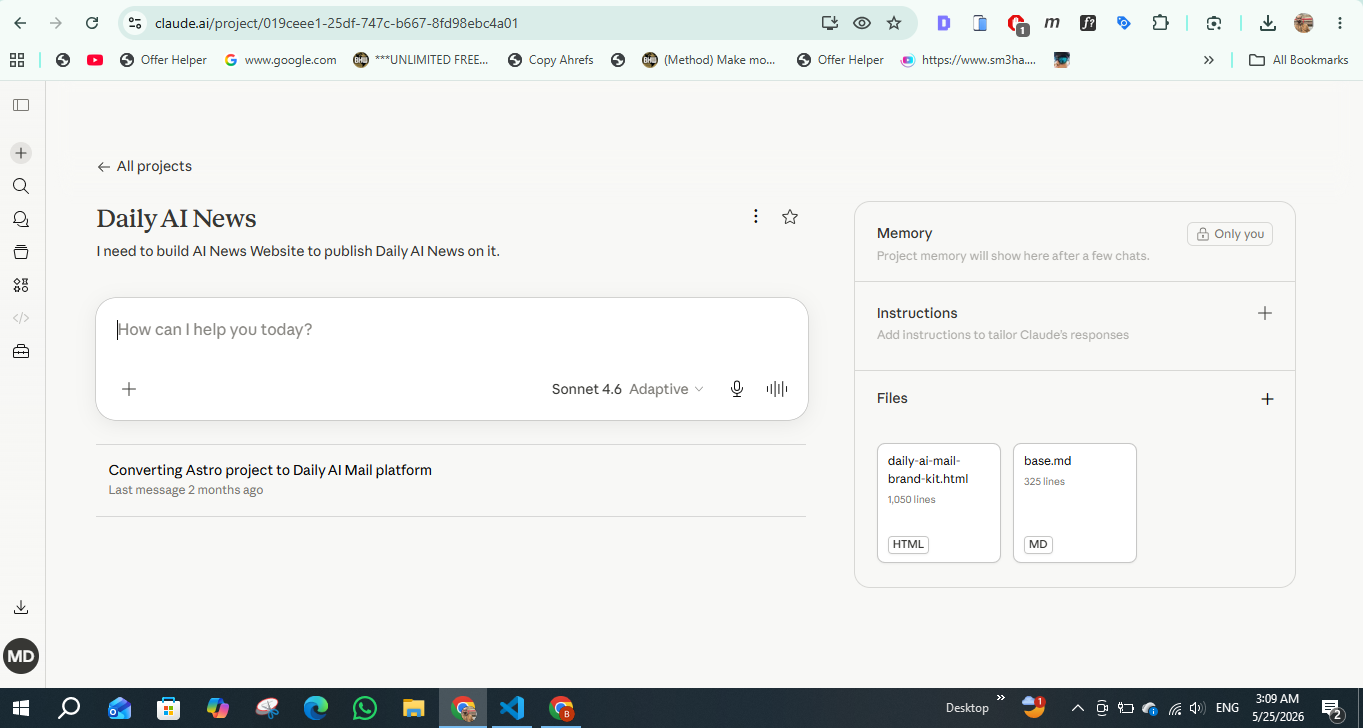
Source: Daily AI Mail Claude Projects workspace.
A normal Claude chat might give me a good answer. A well-built Claude Project gives me a relevant answer faster, with less prompting, fewer reminders, and better continuity.
The difference is not only convenience. It changes how you think.
In a regular chat, I often write long prompts because I am trying to rebuild the environment. In a Project, the environment already exists. My prompt can be shorter because the Project carries the background.
That is why Claude Projects feels closer to a second brain than a normal AI conversation. Not because it stores everything I know, but because it preserves enough working context to help me continue where I left off.
How I structured my Projects after three months of testing
One Project per client. One for research. One for editorial drafts.
Because I am using Claude as a free user, I do not have unlimited space to create a Project for every small task. Free users can create up to five Projects, according to Anthropic’s current documentation.
At first, that felt restrictive. Then I realized it was useful.
The limit pushed me to ask: what are the contexts I return to every week?
For me, the answer became simple.
I created one Project per important client or business context. These Projects contain the brand tone, audience notes, content rules, recurring services, product details, and examples of good output. This is where Claude becomes useful for client-specific work because it does not answer like a generic assistant every time.
Then I created one research Project. This is where I collect article sources, topic notes, extracted facts, competitor angles, and raw information that needs to be turned into something usable.
Finally, I created one editorial drafts Project. This became my writing room. It contains my preferred structure, style rules, headline expectations, internal editorial reminders, and examples of how I want AI productivity articles to sound.
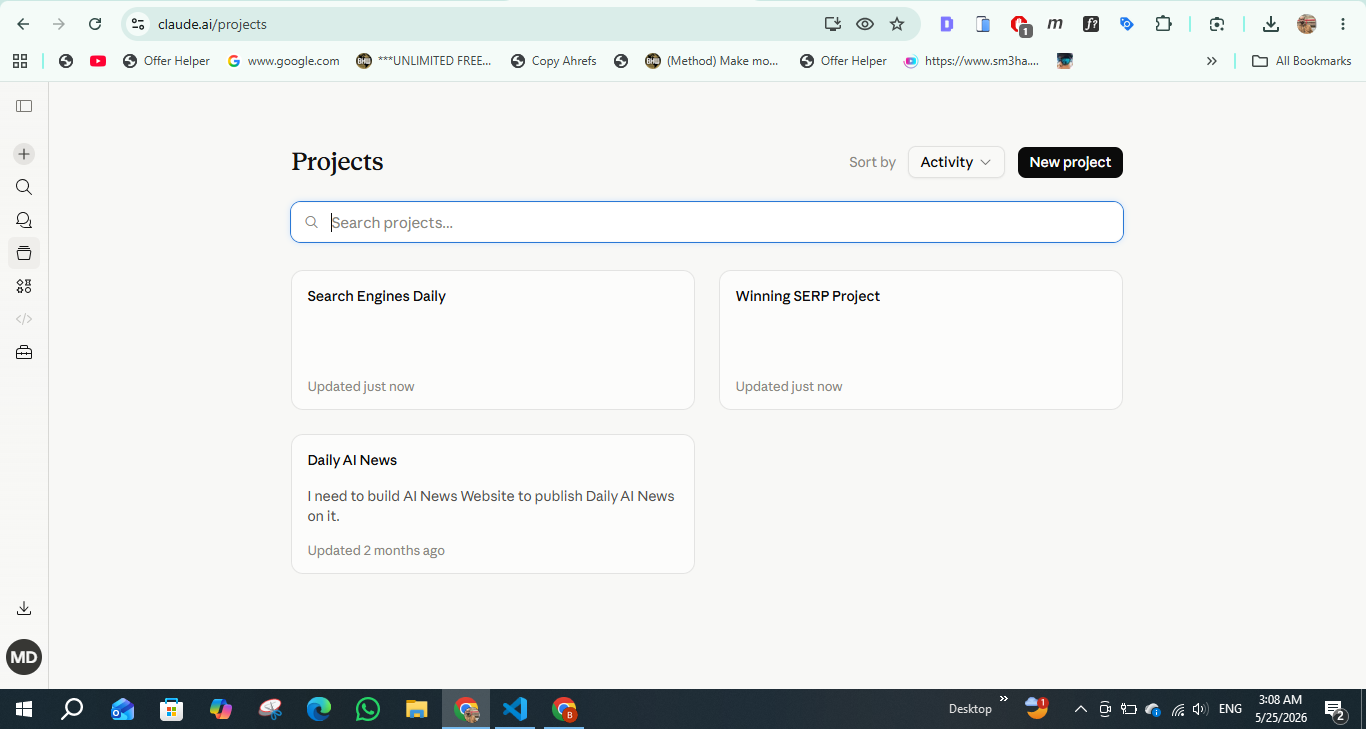
Source: Daily AI Mail Claude Projects dashboard.
This structure made Projects manageable.
The mistake I made early was thinking too granularly. I wanted a Project for every article, every experiment, and every new idea. That became messy quickly. The better approach was to create Projects around recurring workflows, not isolated tasks.
A Project should answer one question: what context do I hate repeating?
If you repeat the same client background, create a client Project. If you repeat the same article rules, create an editorial Project. If you repeat the same research process, create a research Project.
That is the practical core of this Claude Projects tutorial. Do not build a beautiful system. Build a useful one.
The custom instructions that eliminated my most repetitive prompts
Custom instructions are where Projects became sticky for me.
Anthropic says Projects let users define custom instructions so Claude can tailor responses, such as using a certain tone or answering from a specific professional perspective.
That sounds small until you use it every day.
My old workflow was full of repeated prompt fragments:
- “Write in a direct editorial style.”
- “Do not use hype.”
- “Keep paragraphs short.”
- “Avoid generic AI wording.”
- “Use a journalistic tone.”
- “Do not sound like a press release.”
- “Make the structure suitable for web reading.”
- “Give me screenshot placeholder ideas.”
- “Keep the article practical, not theoretical.”
After moving these into Project instructions, I stopped writing them in every prompt.
That removed friction. It also improved consistency.
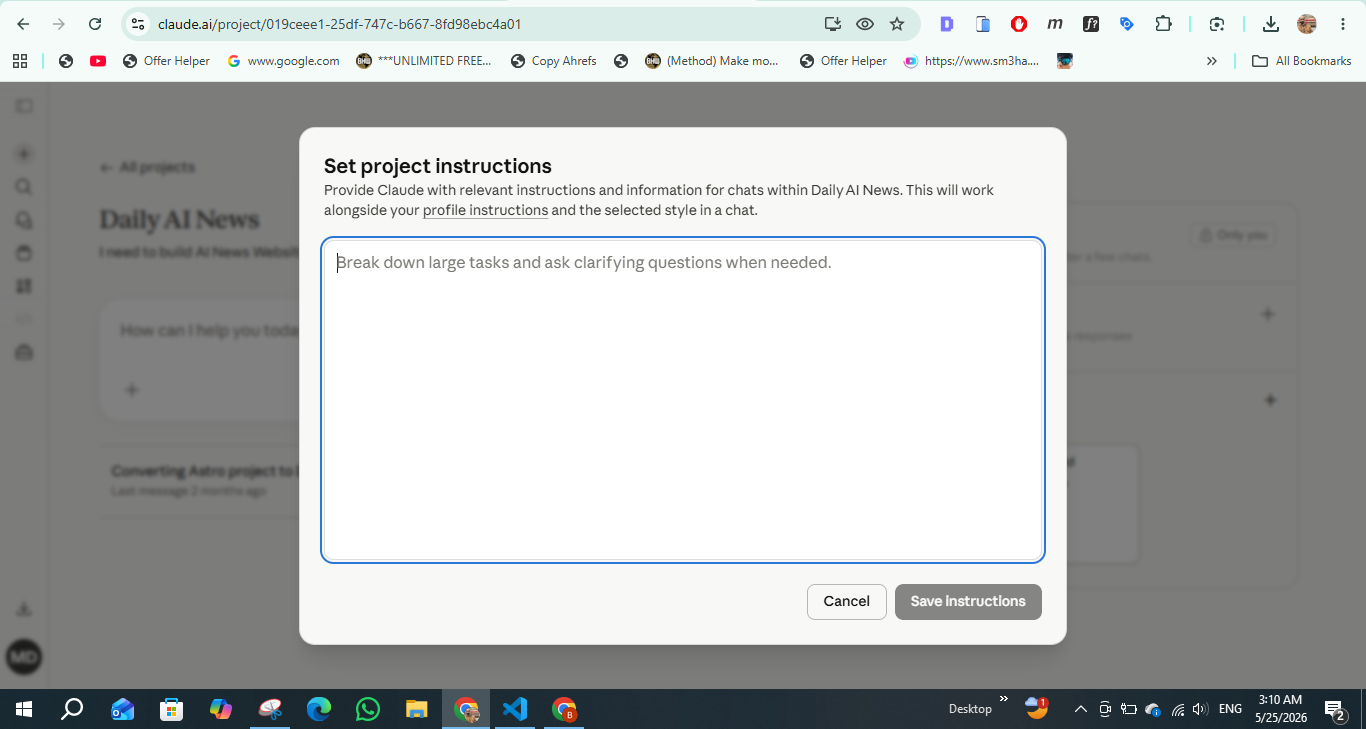
Source: Daily AI Mail Claude Projects settings.
For my editorial Project, the instructions tell Claude to write in a clean, direct, journalistic style. They tell it to avoid hype, avoid unsupported claims, keep paragraphs short, and make transitions feel natural. They also tell it to think like an editor, not a content generator.
For client Projects, the instructions are more specific. They include brand positioning, tone, audience level, services, banned phrases, preferred terminology, and the kind of output I usually need.
For research, the instructions are different again. I tell Claude not to write too early. I ask it to extract facts, separate claims from interpretation, identify missing evidence, and flag anything that requires verification.
That last part is important.
A second brain should not only store information. It should help you think with better discipline. For me, Claude Projects became useful when each Project had a clear behavioral role.
One Project helps me write. One Project helps me research. One Project helps me think like a client strategist.
That is when it stopped being a feature and became a workflow.
The workflow I built around it
Morning briefing. Deep research sessions. Draft review cycles.
My most consistent Claude Projects workflow starts in the morning.
I open the research Project and ask for a briefing around the topics I am working on. I do not ask Claude to invent news. I give it sources, notes, URLs, or article fragments, then ask it to turn the material into a clear editorial brief.
That brief usually includes the central angle, supporting facts, possible risks, missing context, and questions I should answer before writing.
This is where Projects feel different from scattered chats.
The research Project already knows how I want information shaped. It does not rush to write the article. It helps me understand what the article should become.
Then I move into a deep research session. I add source excerpts, competitor notes, screenshots, or raw observations. Claude helps me cluster the material, identify repeated points, and separate the obvious angle from the stronger one.
That matters for AI productivity writing because many articles are too shallow. They describe a feature, list benefits, and stop. I want the article to explain how the feature changes a real workflow.
After that, I move to the editorial drafts Project. This is where I ask Claude to turn the brief into a first draft, but with my writing rules already present. I do not need to restate the entire editorial style each time.
Finally, I use Claude for review cycles.
I ask questions like:
- Where does the article repeat itself?
- Which section needs a stronger bridge?
- Which claim needs a source?
- Which paragraph feels generic?
- Where should I add screenshots?
- What would make this more Discover-friendly without clickbait?
Those review prompts became more valuable because the Project already understands the article type and editorial standards.
That is the key difference between Claude Projects and a normal AI chat. In a normal chat, the model helps with the current prompt. In a Project, it helps inside a defined working system.
The unexpected use case that became my most-used Project
The Project I use most is not the client Project.
It is not even the research Project.
It is my “editorial memory” Project.
I did not plan it that way. I created it as a place to store writing instructions and article patterns. Over time, it became the place where I refine my own editorial thinking.
Whenever I notice a repeated writing issue, I add it there.
If an intro feels too slow, I ask Claude to diagnose why. If a transition feels weak, I ask for alternatives. If an article repeats the same idea in three places, I ask Claude to rebuild the structure. If a headline feels too SEO-heavy and not Discover-friendly enough, I use that Project to create better angles.
This became my most-used Claude Projects use case because it helped me improve the system, not just the article.
The Project slowly became a place where my writing preferences, common mistakes, headline patterns, and editorial rules live together.
Again, this is not a perfect second brain. It does not replace a full notes system. But it works because it is close to the moment of work.
That is where many second brain systems fail. They are great for storing information, but weak at helping during the actual task. Claude Projects sits inside the task itself.
When I am writing, Claude is there. When I am reviewing, Claude is there. When I am refining the angle, Claude is there.
That makes the system more likely to survive.
A second brain is only useful if you actually use it when your real brain is busy.
What Projects still cannot do
It is not Notion or Obsidian. Stop expecting it to be.
Claude Projects is not Notion.
It is not a database. It is not a publishing calendar. It is not a structured wiki. It is not a dashboard builder. It is not the place where I want to manage every task, content pipeline, client note, or long-term archive.
That is why the “Claude Projects vs Notion” comparison needs nuance.
Notion is better for structured storage, databases, tables, content calendars, task views, team documentation, and long-term organization. Claude Projects is better for AI-assisted work inside a focused context.
If you expect Projects to behave like Notion, you will be disappointed.
Projects should not become your entire knowledge base. They work better as active workspaces. I use Notion-style systems for storage and planning. I use Claude Projects for thinking, drafting, reviewing, and applying context.
That distinction matters.
Notion is where information can live. Claude Projects is where information can work.
The strongest setup is not Claude Projects instead of Notion. It is Claude Projects alongside Notion or your existing file system.
Use Notion for structured records. Use Claude Projects for active reasoning around those records.
That is the practical answer.
The memory and knowledge limitations that still frustrate me
The main limitation is that Projects still require deliberate context management.
You cannot assume Claude automatically knows everything discussed in every chat inside a Project. If a decision matters later, you need to save it in the Project knowledge, update the instructions, or summarize it clearly.
This is where the “second brain” metaphor can become misleading.
Claude Projects feels like a second brain because it reduces context repetition. But it is not a perfect memory system. It does not automatically organize your thinking the way a human assistant might. It still depends on what you upload, what you instruct, and how carefully you maintain the Project.
There are also usage limits. Anthropic explains that usage limits control how much you can interact with Claude over a period of time, depending on your plan and usage.
As a free user, this matters. Projects may be available, but heavy use will still run into limits faster than a paid workflow. That does not make the feature useless. It just means you should reserve it for high-value work, not random questions.
Another frustration is that Projects can become messy if you treat them like dumping grounds. Uploading every file, every note, and every half-idea does not make Claude smarter. It can make the workspace harder to control.
The best Projects are curated.
My rule now is simple: only add context that improves repeated work.
If a document is only useful once, I paste it into a chat. If it will shape future answers, I add it to the Project. If an instruction keeps saving me time, I place it in custom instructions.
That discipline keeps the Project useful.
Final verdict: Claude Projects works because it reduces the cost of starting again
Claude Projects did not replace my notes app. It did not replace my files. It did not replace my editorial calendar.
But it changed how I use AI.
Before Projects, every serious Claude session started with setup. Now, the setup lives inside the workspace.
That is why I keep using it.
For me, the value of Claude Projects is not that it creates a perfect second brain. The value is that it removes the most annoying part of working with AI: explaining the same context again and again.
After three months, my conclusion is simple.
Use Projects for recurring work, not random chats. Use custom instructions aggressively. Keep each Project focused. Add only knowledge that improves future answers. Do not expect it to be Notion. Do not expect it to remember everything automatically.
If you treat Claude Projects like a magic memory system, you will be frustrated. If you treat it like a focused workspace with reusable context, it becomes one of the most practical AI productivity features available.
And the best part is that free users can actually test it meaningfully.
Five Projects are enough to build a real system if you choose carefully. One for a client. One for research. One for editorial drafts. One for your own thinking. One for whatever workflow you repeat every week.
That is enough to see the value.
Claude Projects is not the second brain that stores my whole life.
It is the second brain I open when I need to work.
8 Comments
Projects is the first Claude feature that actually changed how I work week to week. Once the context is organized well, it feels much less like starting over every session.
Agreed. The biggest win is not having to re-explain tone, goals, and source material every time I reopen a workflow.
The use case examples were solid. I especially liked the framing around turning Projects into a repeatable workspace instead of just a folder for random chats.
I use Projects for client onboarding notes and it has been great, but file limits still become noticeable once you start treating it like an actual knowledge base.
That is exactly where I landed too. Projects is excellent for persistent context, but you still need some discipline about what goes in and what stays outside.
The tutorial section was helpful because most posts about Projects stay too abstract. Seeing concrete ways to structure research, writing, and recurring tasks makes the feature easier to adopt.
For solo operators this is probably the closest thing to an AI workspace that does not collapse into chaos after a week. That line in the article felt earned.
I would still love version history inside Projects, but even without it this feature is much closer to how people actually manage ongoing work than plain chat threads.
Sign in or create an account to leave a comment.